Documentation as a First-Class AI Citizen
Date: 2026-06-25 7:30pm CT
Introduction
Documentation has always played an important role in software development, yet in many companies it is a secondary task that loses priority when deadlines are at risk. AI's need for context changes this dynamic. AI is a natural language tool that has a one-to-one relationship between the quality of its results and the quality of the context provided in the prompt.
To understand how documentation serves AI, it helps to first understand the types of documentation involved. At the broadest level, instruction files tell AI how to work: they define standards, patterns, and behaviors. README files provide entry points into a product, application, feature, or repository. Architectural decision records (ADRs) capture the why behind technical solutions. Inline comments expose existing functionality directly in the code. Together, these form the documentation ecosystem that context is built from.
Context is built with documentation, including inline code comments, README files, architectural decision records (ADRs), instruction files, markdown files, and any other natural language documents.
Good documentation enriches context for your prompts, and good context produces better results. This relationship between prompting results and context means that documentation is no longer optional. Instead, it should be treated as a first-class citizen in any project that uses AI. This naturally leads to the question: how do we provide good context through documentation? To answer this, a working definition of AI context is required.
Context
Context can be defined as the collection of instructions, related facts, constraints, requirements, conventions, relationships, and company policies that define a project and/or product. There are also various types of context that work together to narrow scope and bring focus to your prompts.
Structural
The best example of structural context is the file system and organization of your project. Where do project files live? Is the codebase organized according to known patterns and best practices? Are boundaries well defined? A well-organized project file system and a detailed explanatory guide direct AI to follow established patterns, and enable setting prompt context simply by dragging directories into the prompt window.
Without this structure, AI can and will place new code in the wrong locations, potentially creating duplicate files and functions because it is unaware of existing code. It will create spaghetti code quickly without structural context. Good project organization and a well-considered file system provide significant benefits to your prompts and enable the delivery of focused, relevant information.
Architectural
Architecture is not right or wrong. It is a position taken based on technical and business decisions. It represents the best possible solution given the constraints of a project. For example, with iOS application development, the programming language is Swift; there is no other real choice. It is an architectural constraint for building iOS apps, along with the SDK you choose to build with. Swift 6 has very specific requirements around async/await, actors, and concurrency.
Making your prompt aware of these decisions greatly increases the likelihood that results will align with your team's architectural decisions. It prevents AI from using anti-patterns [1] and reintroducing problems your team has already solved.
Domain
A prompt produces better results when it is given context about the product, its users, and the data the product will consume. Good domain context enables AI to use the correct naming conventions, create effective data structures, and write meaningful log entries and error messages that empower support teams six months after release.
Constraints
Many industries and companies have regulations and compliance mandates they must adhere to in order to operate in their sectors. These are constraints their products must conform to. HIPAA in healthcare is a good example. It has a direct bearing on how data is handled and how personally identifiable information (PII) is protected. AI can and will produce functionally correct code that violates policy and legal requirements if it does not have the context to be aware of these constraints. Documenting these constraints, their effects, and the policy decisions they drive makes it possible for your prompts to produce compliant results.
Dependencies
All modern projects use frameworks and libraries, each with their own APIs and version constraints. Documenting these enables you to provide dependency context to your prompts and prevent functionality from being reinvented simply because the prompt context lacks this information.
Building Documentation for Context
There are many components to good documentation covering all aspects of a project. Instruction files cover how a prompt should perform its work. Inline comments help expose existing functionality. ADRs provide the why behind technical solutions. READMEs provide an entry point into a product, application, feature, or repository. These types of documentation resources produce better prompt outcomes when combined.
The Documentation Quality Table
The table below maps documentation quality to typical AI output. Each level builds on the previous one, and the gains are not linear—certain combinations produce disproportionate improvements.
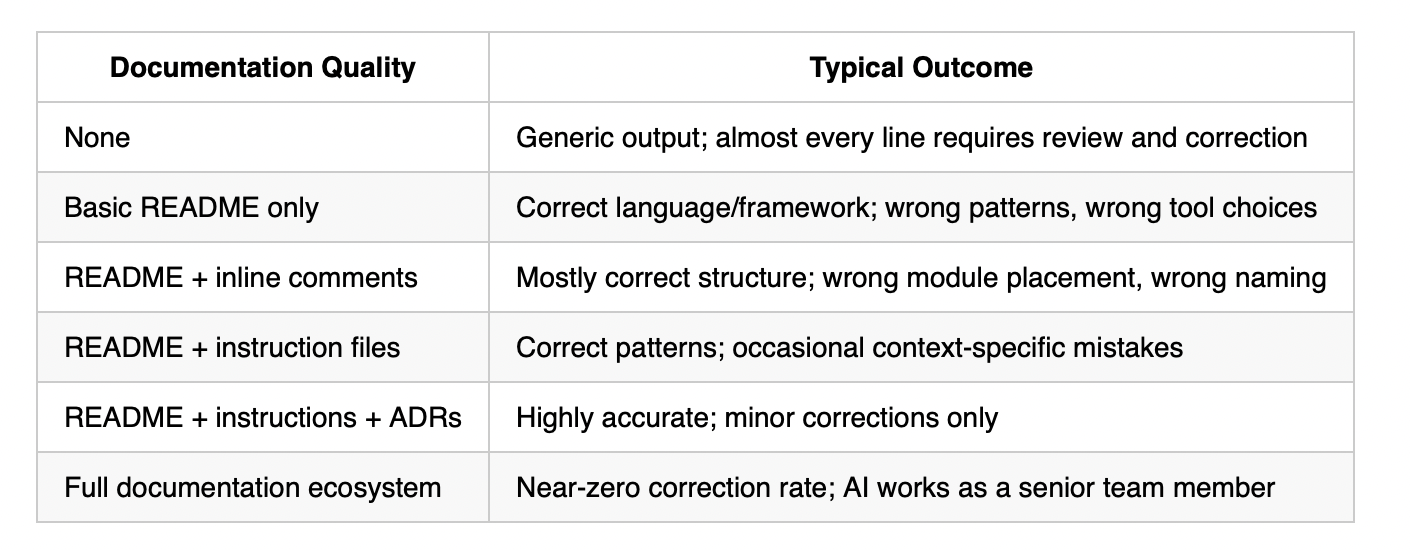
No documentation means the model falls back entirely on its training data. It will produce code that is syntactically correct for the language but has no awareness of your team's conventions, chosen patterns, or existing solutions. Almost every line will require review.
A basic README gives the model enough to select the right language and framework, but without pattern guidance it will make tool choices based on popularity rather than your team's decisions. You will get React when you use Vue, or classes when your team uses composition.
Adding inline comments helps the model understand what already exists, reducing duplication and improving structural placement. However, without explicit instruction on how to work, naming and module decisions remain inconsistent.
Adding instruction files is where repeatable, standardized output begins. The model now knows your conventions, your preferred patterns, and the rules your team has established. Context-specific mistakes still occur because the model lacks the history of why those decisions were made.
Adding ADRs closes that gap. The model now understands not just what your patterns are, but why they exist. This eliminates the majority of remaining errors, as the model can reason about trade-offs rather than guessing.
A full documentation ecosystem combines all of the above with domain context, constraint documentation, and dependency records. This produces output that reads as though it came from a developer who has been on the team for a year. Corrections become minor and infrequent.
Quick Start: Five-Week Implementation Plan
Building a documentation practice requires time for validation, habit formation, and demonstrating value to stakeholders. This timeline uses weeks rather than days because documentation quality reveals itself through use, not immediate testing. Each week allows time to create documentation, apply it in real prompts, gather team feedback, and refine before moving forward. This measured pace ensures sustainable adoption and visible improvements that build organizational support.
Week-by-Week Roadmap
- Week 1: Foundation
- Create documentation repository with organized directory structure
- Write repository README explaining purpose and workflow
- Create first general instruction file covering fundamental coding standards
- Configure team access and integrate with AI tools
- Week 2: Instruction Files
- Document three core coding patterns or standards
- Create language-specific instruction files (e.g., concurrency patterns, API conventions)
- Write test instruction file for unit test standards
- Test each file by comparing AI output with and without it in context
- Week 3: Architectural Decisions
- Identify and document five key architectural decisions as ADRs
- Create ADR template for future decisions
- Establish policy requiring ADRs for new architectural choices
- Validate by testing AI code generation against documented constraints
- Week 4: Drift Detection
- Create drift detection prompt comparing documentation to codebase
- Run initial drift detection and address top five issues
- Add documentation checklist to pull request template
- Schedule weekly drift detection runs
- Week 5: Measurement
- Define 3-5 documentation health KPIs (ADR coverage, AI correction rate, prompt reuse rate)
- Baseline current metrics and create tracking dashboard
- Run team retrospective on documentation effectiveness
- Schedule monthly documentation health reviews
By week five, documentation becomes reflexive rather than effortful, and measurable improvements in AI output quality make continued investment self-evident.
The Documentation Repository
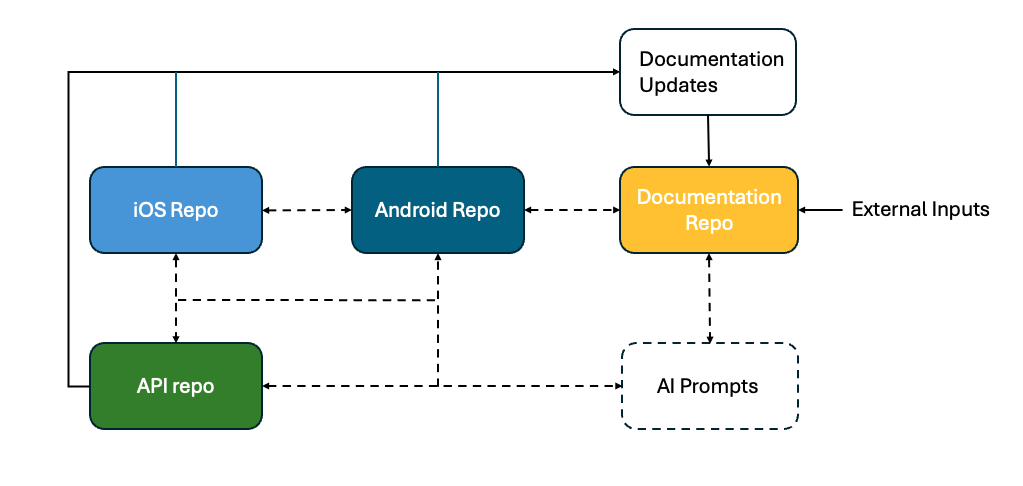
The Case for a Dedicated Documentation Repository
I personally recommend a dedicated documentation repository for a full documentation ecosystem. This approach deserves a direct and honest examination of both its benefits and the objections it raises.
The core argument is simple: your documentation is a first-class input to your development process, not a by-product of it. Treating it as a separate repository makes that explicit. It gives documentation its own history, its own review process, and its own contributors, all independent of the source code it describes.
Addressing the Objections
"This adds maintenance overhead." Yes, it does, and that overhead is the point. Documentation that requires no maintenance is documentation that is not being kept current. Making the maintenance explicit and trackable is preferable to documentation that silently drifts. The overhead is also manageable: a documentation update should be a standard part of completing any user story or pull request, the same way a test is.
"Keeping two repositories synchronized is a significant risk." This is a valid concern, and it is addressed in the Managing Drift section below. The short answer is that AI itself is well suited to detecting and reporting drift between a documentation repository and a source code repository, which substantially reduces the manual burden.
"Onboarding becomes more complex with multiple repositories." In practice, the opposite tends to be true. A new team member pointed at a well-maintained documentation repository can orient themselves to the project's decisions, patterns, and domain without reading source code. The documentation repository becomes the onboarding guide.
"Developers will not maintain a separate repository." This is a cultural challenge, not a technical one, and it is addressed directly in the Team Adoption section below. The short answer is that the workflow must make documentation updates the path of least resistance, not an additional burden.
The Benefits
A documentation repository allows multiple inputs from different sources to occur independently and on different timelines from the source code repository. You can document a product feature before its implementation, during it, and after it, with each as a separate, reviewable contribution. You can connect only the directories relevant to current development work, giving you precise control over the scope of content provided to a prompt. You avoid the common problem of a docs directory inside a codebase that grows stale because no one owns it.
The documentation repository represents the project's actual, living implementation guide, and should ideally be kept free of design documents, as design intent and implementation tend to diverge as a project matures.
Tooling
The workflow described in this article is supported by current AI development tools. Understanding how each tool handles documentation and context makes the approach immediately actionable.
GitHub Copilot: Instruction Files and Prompt Files
GitHub Copilot supports two documentation-driven features directly relevant to this article.
Instruction files [2] are markdown files placed in your repository that Copilot reads automatically when generating suggestions. They allow you to define coding standards, preferred patterns, naming conventions, and any other behavioral rules you want Copilot to follow. Instruction files can be scoped, applied to specific file types or directories. This means your Swift concurrency rules apply only to Swift files, and your unit test standards apply only to test files.
Prompt files [3] allow you to define reusable, parameterized prompts that reference instruction files and other documentation. Rather than rewriting context into every prompt, a prompt file assembles it. Your unit test prompt file, for example, would reference your unit test instruction file, your ADRs relevant to testing strategy, and your dependency documentation, assembling full context automatically.
Cursor: Rules
Cursor supports a similar concept through its rules system. Rules files are markdown documents that define how Cursor should behave across a project or within specific contexts. Like Copilot instruction files, they can be scoped and combined. Cursor's context window management also makes it well suited to a documentation repository workflow, as directories can be explicitly included or excluded from the active context.
General Principle
Regardless of the tool, the principle is the same: documentation that is well-structured, written in markdown, and organized by concern (structural, architectural, domain, constraints, dependencies) can be selectively provided to any AI tool's context window. The investment in documentation quality pays dividends across every tool your team uses, now and in the future.
Managing Drift
A classic issue with documentation is drift: the gap between what is documented and what has actually been implemented. Traditionally, the solution is a manual task requiring an engineer to stop writing code and spend time assessing and addressing the drift. This problem still exists with AI and needs to be managed.
Writing a prompt to handle drift detection is extremely beneficial to a project's documentation health. The prompt reviews the documentation repository and the codebase repository, reports areas of concern (for example, outdated API documentation or references to deprecated dependencies), and makes recommendations. Those recommendations can be applied immediately or used to open a pull request with the changes required to address the drift.
This turns drift management from a periodic, painful manual task into a routine, automatable one. It also reinforces the value of the documentation repository: because it is separate and explicitly maintained, drift is detectable in a way it rarely is when documentation lives alongside the code it describes.
Markdown Documents
AI has brought new significance and power to markdown [4] documents. This is because AI is, at its core, a natural language tool, and markdown is excellent for note-taking. It allows for code snippets, tables, and a simple set of document features such as headers and bulleted lists. These features allow for detailed descriptions and rich explanations of almost anything, which is why markdown is so well suited for use with AI.
Instruction Files
Instruction files are written in markdown and detail how a task or set of tasks should be executed. You can define which files the instructions apply to. For example, your coding standards instructions can be applied only to source code files, and your unit test instructions applied only to unit test files. This gives you the flexibility to have either a very narrow focus with detailed instructions, or broad instructions that cover the entire project and codebase.
It is incredibly useful to have your prompt files reference your instruction files. For example, your unit test prompt would read the unit test instruction file before any unit tests are written. Good instructions promote and enforce standardized, repeatable prompt results, which alone makes them a valuable part of your development workflow.
Team Adoption and Managing Cultural Resistance
The technical case for documentation as a first-class citizen is straightforward. The harder challenge is cultural. Developers have historically deprioritized documentation, and for understandable reasons: under deadline pressure, writing documentation feels like time taken away from shipping. That instinct does not disappear simply because AI makes documentation more valuable.
Changing this requires deliberate effort at both the process and the team level.
Make Documentation Part of the Definition of Done
The most effective structural change is to make documentation a formal requirement for completing work. A user story is not done when the code is merged. It is done when the relevant documentation has been updated. This applies to instruction files, ADRs, README files, and inline comments. When documentation is a checklist item on a pull request template, it stops being optional.
Reduce the Effort of Writing Documentation
Resistance to documentation is often resistance to the effort of writing it, not to documentation itself. AI removes most of that effort. A developer who has just implemented a feature can ask AI to draft the ADR, update the README, and suggest inline comments, then review and approve rather than write from scratch. When documentation takes minutes instead of hours, the cultural barrier drops significantly.
Lead With the Benefit, Not the Obligation
Teams adopt new practices faster when they experience the benefit directly. Run a demonstration: take a feature with no documentation context and show the AI output. Then add instruction files, an ADR, and a README, and show the output again. The difference is immediately persuasive. Engineers who see AI produce accurate, on-pattern code because of good documentation become advocates for maintaining it.
Assign Ownership
Documentation without an owner drifts. Assign a documentation owner (not necessarily a dedicated role, but a named responsibility). On smaller teams this might rotate. On larger teams it might sit with a tech lead or principal engineer. The key is that someone is accountable for the documentation repository's health, the same way someone is accountable for the CI pipeline or the test suite.
Measure It
What gets measured gets maintained. Define simple KPIs for documentation health: coverage of ADRs against architectural decisions, README completeness scores, instruction file coverage of file types. Review them in the same forums where code quality metrics are reviewed. Teams that treat documentation as measurable tend to treat it as important.
Conclusion
Just as automated testing helps manage the incredibly high rate of change that AI brings to a project, documentation helps with comprehension of that change. This intuitively makes sense: if you are using AI effectively, you spend more time reading and analyzing than on implementation—that is AI's role. The same principle applies to documentation: use AI to write it. AI consistently produces better documentation than most developers or software engineers, and at a fraction of the time cost.
A full documentation ecosystem is a contract between your development team and AI. When maintained well, it is an excellent mechanism through which team decisions, architectural constraints, approved patterns, and domain knowledge are made available to every participant in the development process, human and AI alike.
Each layer of documentation reduces the AI's reliance on statistical defaults and increases its reliance on your team's specific, deliberate decisions. The result is output that reads as though it was written by a developer who has been on the team for a year—because, in a meaningful sense, the documentation is that engineer's accumulated knowledge, made available on demand.
Recommendations
- Implement a documentation policy and incorporate it into the team's workflow
- Use AI to help create and manage documentation
- Use a prompt file to document and enforce your documentation standards
- Structure your documentation so AI can parse only the information required for a given prompt
- Use dynamic documentation creation to iteratively build context
Process and Standardization
- Use instruction files for standardized and repeatable results
- Make documentation a requirement of user stories
- Manage drift between implementation and documentation
- Use a multi-repo setup for documentation and code
- Make markdown the standard document format
- Develop KPIs for measuring documentation success
- Test prompts with and without documentation
References
- Anti-pattern — https://en.wikipedia.org/wiki/Anti-pattern
- Instruction files — https://docs.github.com/en/copilot/how-tos/copilot-on-github/customize-copilot/add-custom-instructions/add-repository-instructions
- Prompt files — https://docs.github.com/en/copilot/tutorials/customization-library/prompt-files
- Markdown — https://commonmark.org