GitHub Actions: A Composable Component Approach to DevOps and CICD
Date: 2025-05-23
Introduction
The ❤️ for GitHub Actions continues with the ability to design and build a composable component approach to automation and CICD. GitHub Actions and workflows are designed to be composable from the ground up. A good DevOps engineer will leverage this fact as they design and build your organization's CICD pipelines.
Whether you're working with a monolith application codebase or a modern micro-services design, both will benefit from your DevOps engineer(s) using a composable component design to CICD. This is a key concept to embrace because your CICD implementation has a direct impact on your automation efforts and the organization's ability to evolve its processes to reach operational excellence. Let's concisely rephrase that:

I think GitHub Actions is an event-driven automation platform that is really good at delivering CICD services and solutions, but out of the box this CICD functionality does not exist!
GitHub Actions Terminology
GitHub Actions provides the majority of its composability via actions and workflows, but the custom components will be developed by your DevOps engineers. Let's define the key components of the GitHub Actions platform for future discussion[1]:
Workflow: A YAML file that defines a reusable configurable process with one or more jobs that are run on execution
- Event: A unique activity that occurs in a GitHub repository and can trigger a workflow
- Job: A set of steps a workflow will execute when a run is triggered by an event
- Step: A shell script or Action
- Action: An encapsulated repeated task for the GitHub Actions platform, it has an interface and an implementation
- Runner: A server that runs the triggered workflow
Organization
Our efforts will focus on the arrangement of workflows and actions within the GitHub organization to enforce componentization of core CICD workloads such as build, test, deploy and notify. The GitHub Actions docs provide us with the pivotal information that illuminates the way and it's an important recommendation[2]:
If you're developing an action for other people to use, we recommend keeping the action in its > own repository instead of bundling it with other application code. This allows you to version, > track, and release the action just like any other software.
This fact is the core principle of the composable component approach. If it's shared then it should be an action that is located in its own GitHub repository. This simple choice enforces all the best practices of software development and it is scoped to the shared CICD resource. Software engineers get to practice developing and working in a component environment, an important skill when working in the cloud.
GitHub Action Repository
There are well-established conventions for a GitHub Actions repository including a detailed README [3], the location of workflows in the .github/workflows directory. GitHub Actions requires a metadata file called action.yml or action.yaml. This file defines the inputs, outputs and functionality offered by the action. This file must be present.
Additionally, the action representing a CICD resource can be developed, tested and deployed in exactly the same manner application code is, including unit testing - just as advertised 😉
I also find it useful to offer a reusable workflow[4] that consumes the action that can be run manually by engineers (workflow_dispatch, workflow_call) or automation.
Teamwork
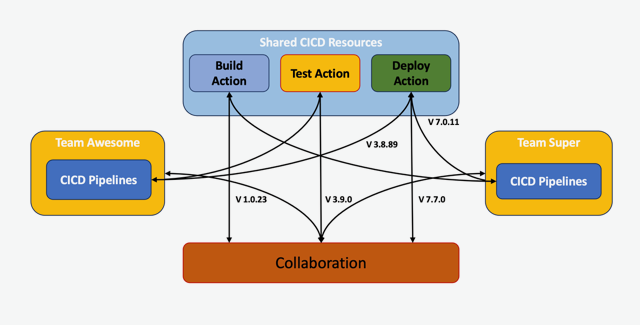
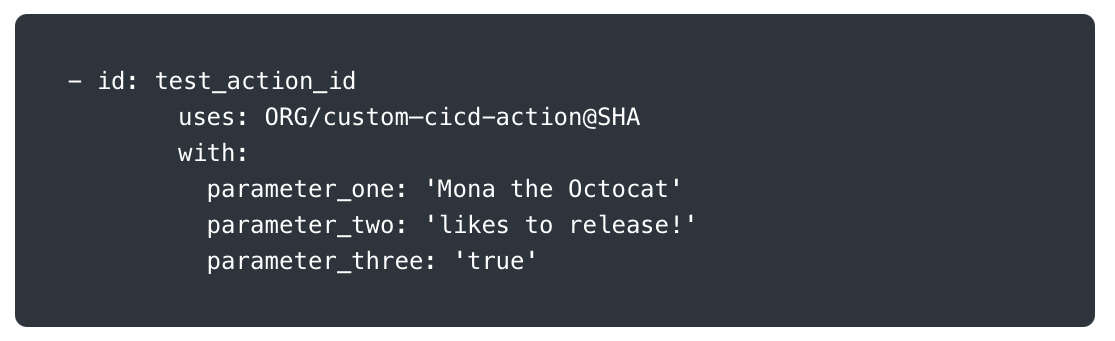
The workloads remain largely the same with minimal overhead as the location of the work is shifted from the call site (application repository) to the action's repository. At the call site it becomes boilerplate consumption of a GitHub Action. An engineer needs access to the repo to change the action which helps with maintaining the action's immutability in your CICD pipelines. If an engineer or team requires changes they can be given permissions to the action's repository to open pull requests. While developing, the engineer simply changes the @SHA ref in the workflow where the action is called. Multiple teams are free to adapt the action as needed with customization if required.
Newly formed teams or existing teams can greatly benefit from not having to re-create their CICD resources from scratch for new projects. Standardization is a long-term effect of this approach fostering collaboration at a reduced risk that enables improved reliability, faster delivery and greater stability.
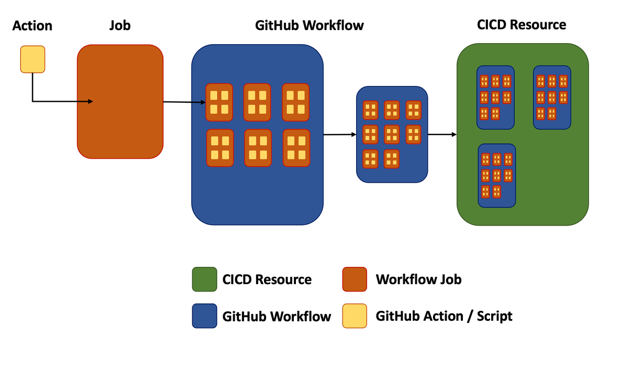
There are different paths to consuming or using either workflow or an action. No way is right or wrong, but each offers different abilities. An action runs in a workflow's job's steps and cannot run outside of a workflow. An action has a one-to-one relationship with a workflow's job step. A workflow runs on a runner and can be run either manually or via automation and a unit of work is a job. Workflows can be nested.
It is also possible to use repository_dispatch[5] events to connect the application repository to the CICD Actions repository but requires a little more work. I acknowledge it here as it could be useful with a monolith application codebase.
Conclusion
This approach definitely empowers your CICD processes by enabling multiple contributors from different development teams. Maintenance and updates are another area where you can expect positive change. Development work is carried out and tested in the action repository. When ready, the application team simply updates the action reference and any new parameters required. All done with relative calm and ease.
With automation you pay costs up front to utilize operational efficiency later - this approach is no different. After the initial setup you should see a drop in DevOps related activity since the .github/workflows directory is populated with wrapper workflows - workflows that call reusable workflows and actions.
The single biggest benefit from adoption of this approach is the behavioral change in application team's work patterns. Your team is working in a composable component environment along with all your other application teams 🏁
References
- https://docs.github.com/en/actions/about-github-actions/understanding-github-actions
- https://docs.github.com/en/actions/sharing-automations/creating-actions/about-custom-actions
- https://github.com/marketplace/actions/readme-template
- https://docs.github.com/en/actions/sharing-automations/reusing-workflows
- https://docs.github.com/en/actions/writing-workflows/choosing-when-your-workflow-runs/events-that-trigger-workflows#repository_dispatch